All in one place: The new dashboard in simpleshow video maker
Written by Tim Moss | 2nd September 2026
simpleshow video maker has a new look. The new dashboard makes getting started with video creation more modern, organized, and even easier.
But the dashboard is more than just a visual update. It is the central starting point for everything you do in simpleshow: Here, you can find your videos, manage existing projects, and start working on your next video idea.
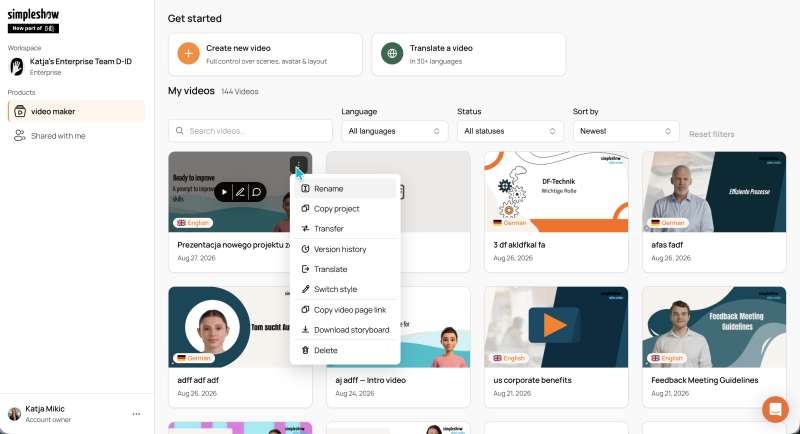
After logging in, you land directly on your dashboard. From here, you can create a new video or continue working on existing projects.
Everything you need is in one place: your videos and videos others have shared with you. As your project library grows or more people collaborate in simpleshow, the dashboard helps you quickly find what you need.
The new dashboard has been designed to feel cleaner and more modern. Videos, navigation, and key features are easier to scan and access.
Filters let you narrow down your video list by criteria such as language or status. You can also sort your videos, making it easier to organize larger project libraries.
Instead of clicking through different areas of the platform, you can access the videos you are currently working on directly from the dashboard.
The new structure also prepares simpleshow video maker for what comes next. New products and features, such as interactive roleplays for business use cases, can be integrated into the platform more easily in the future.
The templates combine professionally designed layouts and visuals that automatically adapt to your topic. This makes it easier to choose a visual style that fits your video without building the design from scratch.
Whether you are creating content for internal communications, training, marketing, or other business use cases, the different templates provide more visual variety and help you create a professional video in just a few steps.
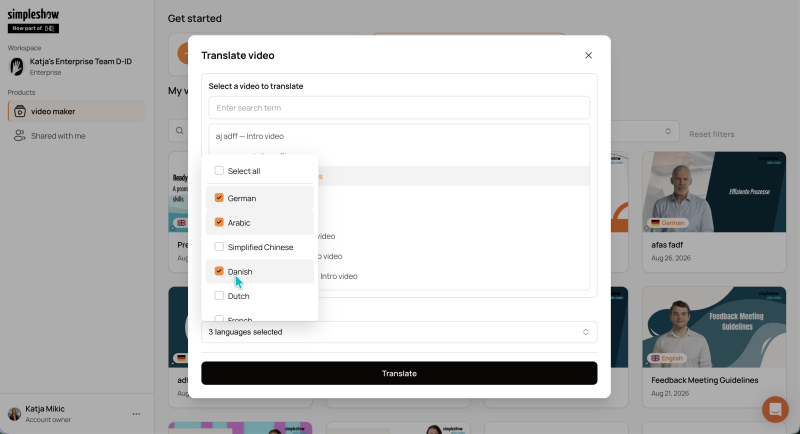
If you want to use a video across different markets, locations, or teams, you can start a translation directly from the dashboard. You don’t need to create a new project from scratch. Instead, you can build on an existing video.
This makes it easier to create and centrally manage multiple language versions of the same content. It is especially useful for companies that use training materials, internal communications, product information, or marketing content internationally.
Even when you have multiple language versions, the dashboard helps you keep track of them. You can filter your videos by language and quickly find the version you want to edit or reuse.
This makes the dashboard not only the starting point for creating new videos, but also a central place for localizing and managing existing content.
Many functions are available directly from each video. Right-click a video to open additional options and manage your project without opening it first.
The dashboard therefore serves not only as an overview, but also as a central hub for managing your video projects.
You can also access your personal settings directly from the dashboard. This keeps video creation, project management, and account settings closely connected and easy to reach.
A good dashboard should do one thing above all: stay out of your way.
That is why the new simpleshow dashboard combines a fresher, more modern look with a clearer overview of your projects and the key features you need for your day-to-day work.
Whether you want to create a new video, continue working on an existing project, create another language version, or manage older videos, the dashboard is your central starting point.
Discover the new dashboard and start creating your next video with simpleshow.