Create on-brand business videos faster with pre-designed styles for every use case
Written by Tim Moss | 8th July 2026
Table of Contents
Key takeaways
- Start with a professional layout instead of designing every video from an empty canvas.
- Select from preconfigured layouts that come to life based on your topic. Illustrated videos, avatar videos, graphic explainers, mixed formats – whatever style you prefer.
- Choose from different visual styles for training, onboarding, internal communications, product updates, sales content, and more.
- Turn your script into an editable video draft with context-relevant video scenes, images, hybrid backgrounds, and text placement.
- Your company colors, logos, and fonts are automatically applied to keep every video on brand.
Your script is approved. The message is clear. Now you have to decide what every scene should look like:
“Which visual style fits the topic? Should it be an illustrated video, use realistic footage, feature an avatar, or combine different elements in a mixed media format? Should the video feel formal, friendly, energetic, or understated? And how do you make sure the result looks professional without making every company video look the same?
These decisions add up quickly, especially when video creation is only one part of your job.
The new design templates in simpleshow video maker give you a better starting point. Choose a professional layout that fits your use case and preferred visual style. Add your text, and simpleshow creates a ready-to-edit first draft with topic-relevant visuals, backgrounds, and text placement.
The style of your choice defines the overall look and structure. The context of your script influences what appears in each scene. You get more visual variety, less manual setup, and a first draft you can start with.
The difficult part often starts after the script is finished
In many companies, the person creating the video is not a professional designer. It might be an L&D manager explaining a new process, a product marketer preparing a feature announcement, or someone in internal communications sharing a leadership update.
They usually know what the video needs to say. The challenge is deciding how it should look.
Starting with an empty canvas means answering the same questions again and again: How many scenes do we need? What should viewers see? Is the image too generic? Does the style fit the audience? Does the text work on screen?
The new pre-designed layouts shorten the distance between the script and the first useful draft. A broader choice of styles also gives creators more freedom without asking them to build a visual concept from the ground up.
Start with a layout that fits the job
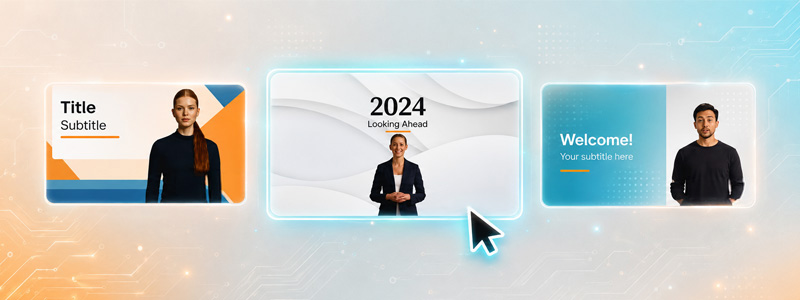
A cybersecurity course should not look like a product launch. A leadership message needs a different visual tone from a software tutorial, and an onboarding video should not feel like a quarterly business update.
Creating videos for all these use cases can quickly become time-consuming, especially when every project needs a different look. Teams have to find the right visual direction, select suitable assets, and build a professional design before they can even focus on the message.
The new templates make it easier to produce professional videos in a style that fits the purpose, audience, and tone of the content.
- A software tutorial can use a clear and structured format that makes each step easy to follow.
- An onboarding video can feel warmer and more personal.
- A compliance course can communicate authority without becoming dry
- A product launch can use larger visuals and a more energetic design.
The audience also shapes the presentation. A sales video for HR leaders may focus more on people, learning, and employee experience. A version for IT decision-makers may require a more technical and information-led approach.
This gives teams more visual variety without slowing down video creation. Videos can look different when the message requires it, while the creation process remains quick, simple, and manageable for people without design or production expertise.
Add your text and get a video draft you can work with
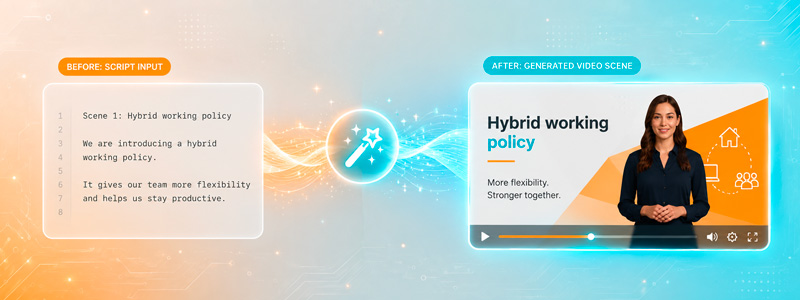
Once you have selected a style template, you add your script. simpleshow analyzes the context and builds the first draft. Each scene receives suggested stock footage, images, hybrid backgrounds, and text placement that match both the topic and the selected style.
Imagine you are creating a video about a new hybrid working policy. One scene explains when employees are expected in the office. Another covers equipment for working from home. A third tells people where they can find the full policy.
The draft might suggest workplace footage for the office section, a home-working visual for the equipment section, and a cleaner information layout for the final instruction.
The template keeps the video visually connected. Its style influences how text and visuals are arranged. The context of each scene influences the specific assets.
You now have something concrete to react to. Maybe most of the draft works. Maybe one scene feels too formal or a stock clip does not reflect your company. You can replace it.
The aim is not to remove your judgment. It is to save you from searching for and positioning every element before you can review the video as a whole.
Keep visual variety on brand
More choice can raise a valid concern for brand teams: What happens when every department starts choosing its own style?
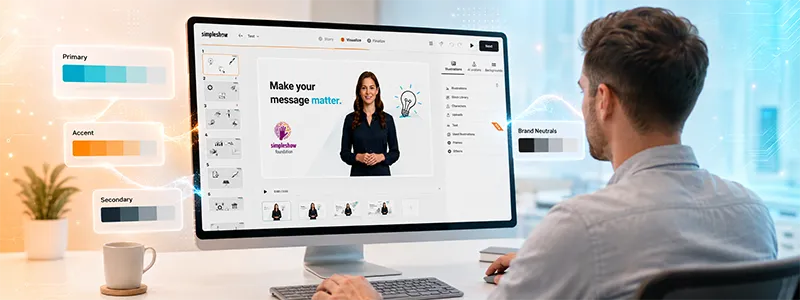
The style templates create a controlled form of variety. Company colors, logos, and fonts can be applied across different layouts. A training video and a product announcement can look noticeably different while still being recognizable as content from the same organization.
Creators do not need to interpret the complete brand guide every time they begin a project. Teams can easily upload or select their company logos, fonts, and brand colors in simpleshow, which are then automatically available within each template. This way, everyone works within professional layouts and established brand settings, ensuring a consistent look across videos. Design teams retain control without correcting the same issues in every routine video.
A more realistic workflow
The template-based workflow looks like this:
- Decide what the viewer needs to understand or do.
- Choose a template that fits the use case, audience, and visual style.
- Add your script or source text.
- Generate a first draft with relevant visuals, backgrounds, and text placement.
- Review whether the content and style fit the message.
- Replace or adjust individual elements.
Instead of facing an empty canvas, you begin with a professional structure and a style chosen for the project. You reach the review stage sooner, feedback becomes clearer, and less time is spent on repetitive setup.
The new simpleshow style templates help teams create videos that are faster to produce, consistently on brand, and visually suited to the job at hand.
FAQ
simpleshow templates are professionally designed video layouts created for different business use cases, audiences, messages, and visual styles. They provide a clear structure for each video and help teams create content that feels appropriate for training, onboarding, internal communications, product updates, sales enablement, and other business needs.
You can choose from different layouts, visual approaches, and design styles depending on how the video should look and feel. This gives training, onboarding, internal communications, product, and sales videos their own visual identity while still allowing every video to remain consistent with the same brand.
simpleshow analyzes the context of your script and uses the selected template to create an editable first draft. Each scene is automatically filled with suggested video clips, images, hybrid backgrounds, and text placement that match both the topic of the scene and the chosen visual style.
Hybrid backgrounds combine several visual elements within one scene, such as stock footage, images, text, illustrations, and graphic design components. This creates a more dynamic and flexible visual result than using only one type of background, while keeping the scene clear, structured, and easy to understand.
Yes. Every generated draft remains fully editable, so you can replace video clips or images, rewrite text, change backgrounds, adjust individual scenes, and refine the overall visual direction. This allows you to keep what works, change what does not, and tailor the video to your exact needs.
Yes. Company colors, logos, and fonts can be applied across different templates, so teams can use a wider range of layouts and visual styles without losing brand consistency. This makes it possible to adapt each video to its purpose while maintaining a recognizable and professional brand identity.
No. The templates provide visual structure, design guidance, and a ready-made starting point, making it easier for non-designers to create professional business videos. simpleshow automatically supports the layout and visual selection, while you remain in control of the content, scenes, and final result.