More creative control: How new mask frames transform your videos
Written by Tim Moss | 29th April 2026
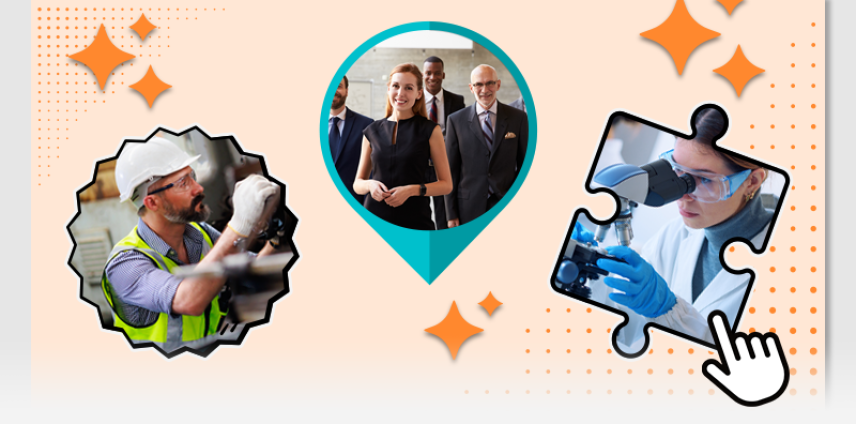
Table of Contents
Key Takeaways
- New mask frames replace most static layouts with seamless, integrated visuals
- Cut-out mode gives you precise control over how content appears inside frames
- Works with illustrations, images, videos, and uploads. No extra tools needed
- Faster workflows, better visuals, and more focus on storytelling

Why Creative Freedom Matters in Video Creation
Great videos don’t just depend on what you say, but on how you show it. The way visuals are arranged, combined, and framed has a direct impact on how clearly your message comes across. If your design feels rigid or limited, your story will too.
That’s why creative control is so important.
In simpleshow video maker, this idea has been evolving step by step. Over time, more flexibility has been introduced to help users shape their videos more freely:
- a wide range of background options
- the ability to integrate stock images and videos
- more ways to combine different types of visual content
Each of these improvements had the same goal: give you more control without making the process more complex.
But even with these advances, one limitation remained: when using frames, visuals still felt placed rather than truly integrated.
That’s exactly where the next step comes in. What if your visuals didn’t just sit inside a frame but actually became part of it?
From Frames to Masks: A Smarter Way to Design Videos
With the latest update in simpleshow video maker, traditional frames evolve into something more powerful: mask frames.
Instead of acting as simple containers, masks wrap around your content and integrate it seamlessly into the design.
This shift changes how videos look and how they are created:
- Less manual positioning
- Less visual friction
- More natural, polished results
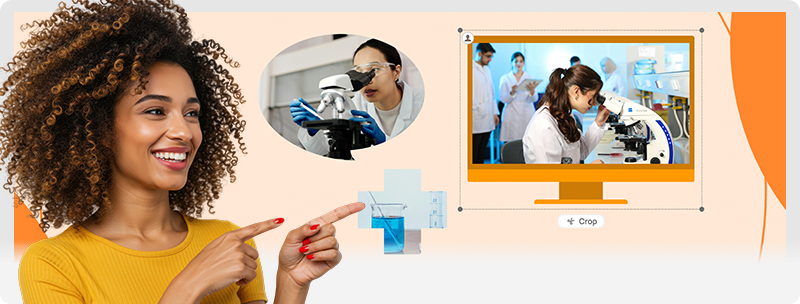
What’s New: Mask Frames at a Glance
A More Polished, Seamless Look
Mask behavior ensures that your content adapts automatically to the shape and blends seamlessly into the frame. Instead of looking placed, visuals become part of the overall design, eliminating hard edges and creating a cleaner, more modern aesthetic with minimal effort.
At the same time, mask frames are designed to work across all types of visual content. Whether you’re using illustrations, images, videos, or your own uploads, everything integrates smoothly within the same system. This means you don’t have to rethink your workflow or adjust your assets to fit specific formats, design adapts to your content, not the other way around.
Cut-out Mode for Precise Control
Need to adjust how your content appears inside a frame? Cut-out mode gives you direct control over how visuals are cropped and positioned within a mask.
Instead of preparing assets externally, you can adjust them right inside the editor. Move, resize, or reposition your image or video until it fits perfectly within the shape. This allows you to highlight exactly the part of the content that matters, whether it’s a specific detail in an image or a key area in a video.
This makes cut-out mode especially useful when working with images or videos that aren’t perfectly framed from the start, helping you achieve clean, well-balanced visuals with minimal effort.
27 New Mask Frames Across All Styles
The update introduces 27 new mask frames:
- Reworked versions of familiar frames
- Plus 8 completely new designs
This variety makes it easier to match your visuals to your message:
Use speech bubbles for dialogue and conversational scenes
Speech bubbles help simulate real conversations and make interactions feel more immediate. They work especially well for explaining processes, showing different perspectives, or guiding viewers through a scenario step by step. With mask behavior, text and visuals inside the bubble adapt seamlessly to its shape, making the interaction feel more natural and less like a static overlay.
Use geometric shapes to structure information clearly
Circles, rectangles, and other geometric forms are ideal for organizing content. They help group related elements, highlight key points, and create a clear visual hierarchy—especially useful for explainer videos or data-driven content. Masks ensure that your content fits perfectly within these shapes, creating clean compositions without the need for manual adjustments.
Use device frames for product or UI-related content
Device-shaped masks, such as smartphones or screens, give context to your visuals. They make it easier to present apps, interfaces, or digital workflows in a way that feels realistic and immediately understandable. With cut-out mode, you can easily adjust what part of your screen or interface is visible, so the most relevant details stay in focus.
Use more organic shapes to create a softer, more dynamic feel
Irregular or hand-drawn shapes add a more natural and less rigid look. They are great for storytelling, emotional content, or when you want your video to feel more approachable and less technical. Mask behavior helps these shapes feel fluid and integrated, allowing your visuals to blend naturally into the overall scene instead of feeling boxed in.
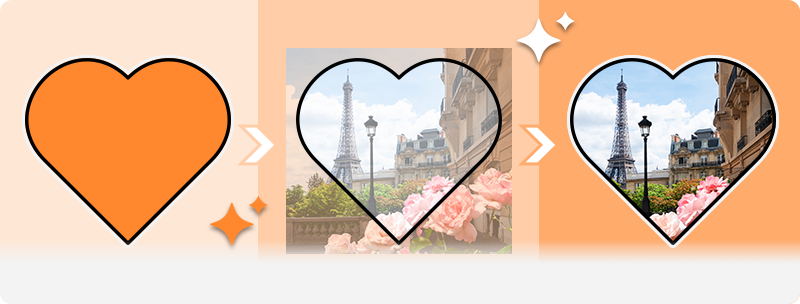
Before vs. After: What Changes Visually
Traditional frames:
- Content feels placed inside a box
- Edges are clearly visible
- Layout feels static
Mask frames:
- Content blends into the design
- Shapes guide attention naturally
- Overall look feels more dynamic and modern
It’s a subtle shift—but it makes a noticeable difference.
How to Use Mask Frames Effectively
Getting started is simple:
- Choose a mask frame that fits your style
- Add your content (illustration, image, or video)
- Use cut-out mode to adjust the composition
That’s it. No complex setup, no extra tools.

More Than a Feature: A Step Toward Smarter Video Creation
Mask frames are part of a bigger shift.
Video creation is moving away from manual layout work toward systems that:
- adapt automatically
- reduce friction
- support creative decisions instead of slowing them down
With mask frames, simpleshow video maker takes another step in that direction.
Ready to try it yourself?
Explore the new mask frames in simpleshow video maker and see how small design changes can make a big difference in your videos.

FAQs
Mask frames are a new type of frame that integrates your content directly into the design. Instead of simply placing visuals inside a container, masks wrap around them and create a more seamless, polished look.
Traditional frames act as containers, while mask frames adapt to your content. This makes visuals feel more integrated and less like they were placed on top of a layout.
Cut-out mode allows you to crop, move, and adjust your content directly within a mask frame. This helps you highlight the most important parts of an image or video without using external editing tools.
Mask frames work with illustrations, images, videos, and user uploads. This flexibility allows you to use different types of content without changing your workflow.
No. Mask frames are designed to simplify the design process. They automatically adapt to your content, making it easier to create professional-looking videos without advanced design skills.
They create a cleaner, more modern look by integrating visuals seamlessly into the design. This helps guide attention, improves clarity, and makes your message easier to understand.
Existing videos will remain unchanged. The mask will only be applied by default in new videos or when you manually select it in an existing one. This ensures that ongoing videos are not affected and can be completed as planned.